Opt Out Guides

SpyFly Opt Out Guide
See what SpyFly knows about you
878,069 have already made this search
Privacy Writer
A. J. MercerAva J. Mercer
Updated
Read
5 min
See what SpyFly knows about you
878,069 have already made this search
SpyFly is a people-search site that can make personal information available online. Names, addresses, and phone numbers are open and easily accessible to anyone who wants to run a free scan. SpyFly’s service may aggregate public records and other sources, then show profiles with personal details that can raise privacy and identity theft concerns.
How to opt out of SpyFly
A SpyFly opt-out starts on the main page. Use the footer privacy link, complete the online form, complete the CAPTCHA, and finish the mail step. The SpyFly takedown path is fast to file, with completion often within 24 hours or a few days.
Checklist:
- Open the privacy page
- Enter your details
- Complete the CAPTCHA
- Open your email
- Use the code
- Save the final note
- Set a reminder to re-opt out
Find out if your private details were exposed

878,069 have already used our service
SpyFly – Common data you may find
TK
Travis Kettner
Publicly accessible to anyone
- Address ******
- Phone +1******
- Relatives ******
- Past Addr. 3 Records
- Email sh****.com
- Court 2 Records
- High risk
Current & past addresses
Home address, move history
- High risk
Phone numbers
Mobile, landline, caller ID
- High risk
Relatives & household
Family, co-residents
- Medium risk
Email addresses
Current and past accounts
- Low risk
Demographic details
Age, DOB, district
15,4M Americans were victims of identity fraud last year. Here’s how scammers use this data:
- Open credit cards
- Apply for loans
- File fake tax returns
- Take over bank accounts
- Target your family
- SIM swap your phone
Quick Facts
| Parameter | Value |
| Domain | SpyFly.com |
| Data Types | contacts, addresses, email address, relatives, possible social identifiers |
| Opt-out Methods | web form and email |
| Identity Verification | code by email |
| Typical Response Time | 24 hours to a few days |
| Re-listing Risk | medium |
SpyFly is a data broker and a people search service. It may compile public information from commercial sources and people search websites, then provide access reports that display contact data in one place. Examine how to opt out of SpyFly and lower the spread of personal data online to protect your privacy.
Step-by-Step Guide
Open the privacy page
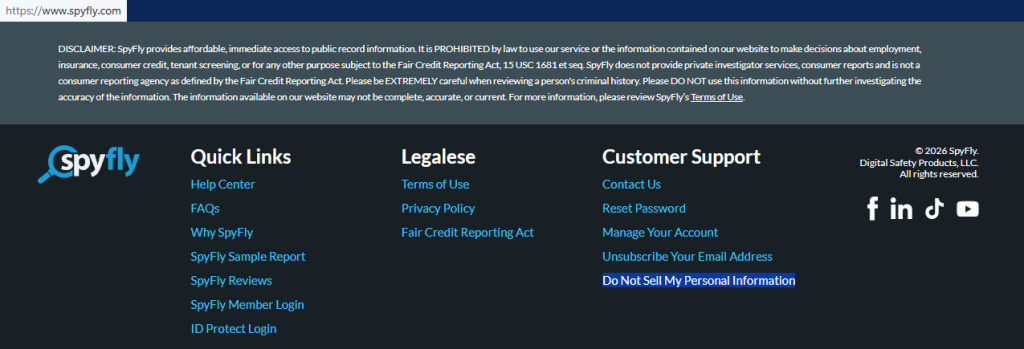
Open the SpyFly website and scroll to the bottom. The footer shows the “Do Not Sell My Personal Information” link. Click it to open the form. The page may also show search results before you remove a listing. A small tip: Keep one tab for the form and one tab for mail so you do not lose your place.
Submit your identifiers
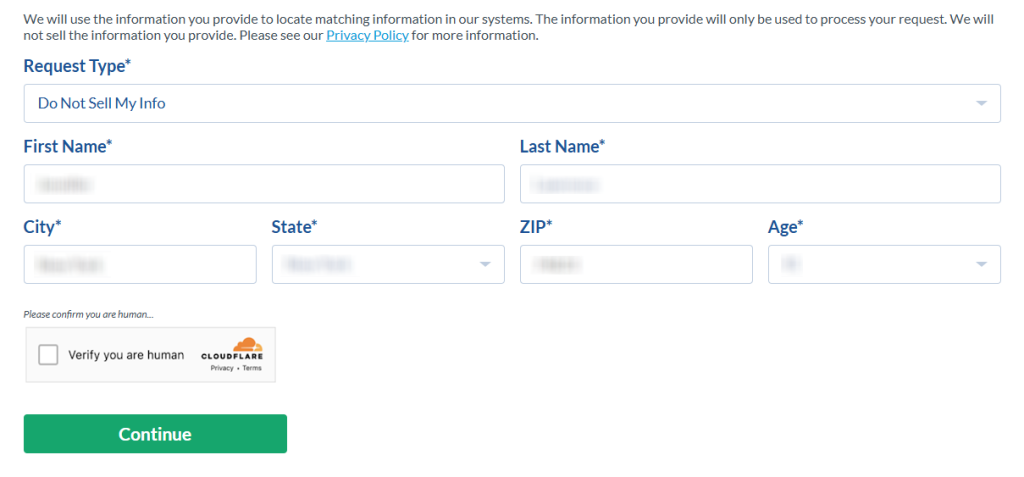
Enter the fields carefully. Include your first name, last name, state, and age. Use the exact details shown in the listing so the system can match the right record in its database. If you save a screenshot, hide personal information first. Complete the CAPTCHA and click continue. These are the main steps to opt out.
Verify your email
After you send the form, check your inbox. Use the newest message. If the mail is missing, check Spam or Promotions. Keep screenshots redacted if they show private details. This is also where SpyFly says the case moves forward after verification.
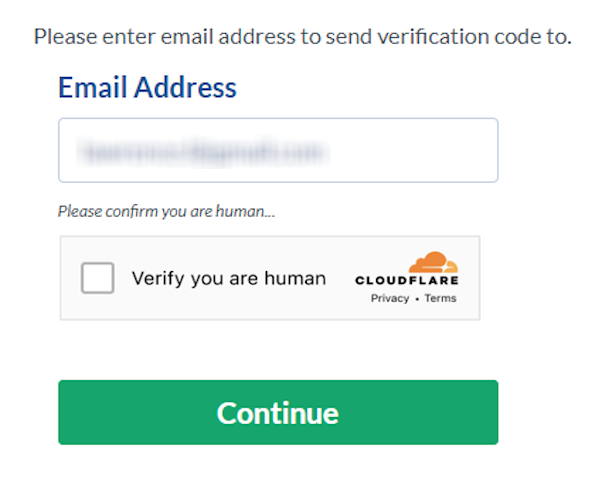
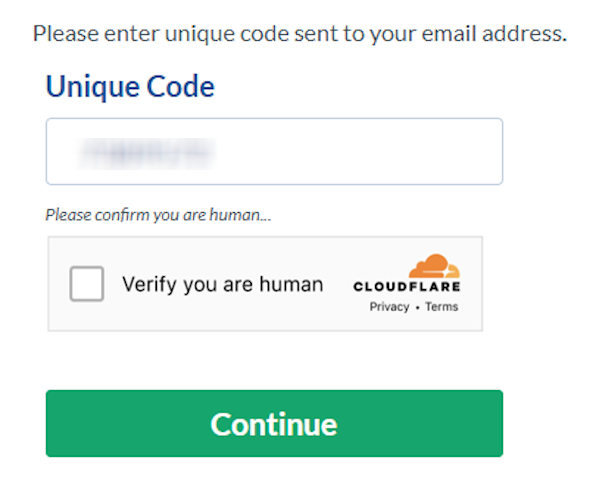
Confirm deletion
Enter the code and remove your personal information here. If more than one listing fits, repeat the same flow for each one so you can remove records linked to older locations, too.
Track confirmation & timeline
Save the final note and your mail in one folder so you can track progress later. The page change is often done quickly. Keep screenshots redacted if they show personal information. A practical tip is to check the listing again after one day and again after one week. If the page still shows the record, use the help path on the site, contact the support team, and include the date and your saved note.
Timelines, Verification & What to Expect
The filing part usually takes only a few minutes. Public guides for SpyFly say the change is often completed quickly, though some broker guides allow a few days. You may get an on-page note and one email after verification. Keep both. If nothing arrives after several days, check Spam once, then send one more request with the same details. If there is still no update after the outer window, use the help page and include the date, your email, and your saved request note.
Edge Cases & Troubleshooting
- No access to the original email or phone: start again with a current inbox and the same listing details.
- “Record not found”: try older cities, old states, or small spelling changes.
- CAPTCHA or form errors: reload the page and solve the CAPTCHA again in a fresh browser window.
- Code not arriving: check spam first, then check the address and try once more.
- Region block for EU, UK, or CA: use the privacy route shown on the site and ask which path applies.
- Account closure vs. listing removal: public listing takedown is different from how to end SpyFly billing.
- Re-submitting after failure: wait a little, then send the same form flow again.
Will my data reappear?
Yes, it can. A data broker may refresh from partner feeds and resellers, so old details can return later. That does not always mean the first opt-out request failed. To reduce repeat exposure, keep your saved mail, check sites like SpyFly every 3–6 months, and file a fresh request quickly if a profile comes back. It’s helpful to remove listings from related data broker sites.
Manual removal works. But only for today
Manual opt-out is possible, but it is rarely permanent. Data brokers can refresh and republish your details over time, so a removal request today may need to be repeated later.
| MANUAL | ||
|---|---|---|
| Time for US Search removal | 2 minutes | ~15 minutes |
| Sites covered | 336+ sites | 1 site |
| When data reappears | Auto re-removed | ~15 minutes |
| Total time per year | 0 hours | 2-5 hours |
| Monitoring for new listings | Continuous | You do it yourself |
| Cost | from $16.50/month | Free |
How ClearNym works
We handle the entire removal and monitoring process so you don’t have to track spreadsheets or repeat opt-outs every quarter.
-
WEEK 1-2
We submit
Opt-out requests submitted
We submit removal requests across all covered sites. You receive a confirmation within 24 hours with a status report.
-
MONTH 1
We verify
Removals verified
We check each site to confirm your data was removed. You get a full report showing status per site.
-
ONGOING
We monitor
Continuous monitoring
We scan for your data every 30 days. When it reappears – and it will-we remove it again automatically.
- Most removals verified within 7-14 days
- We never store or sell your personal data
- Cancel anytime, no long-term contracts
We remove your data for you - faster, verified, trackable.
Discover Which Sites Share Your Private Details—Instantly and Free.
878,069 have already used our service
FAQ
SpyFly provides information from commercial and publicly available sources in one report.
Use the footer link, complete the form, finish the CAPTCHA, pick the matching profile, and follow the mail step.
The site uses them to match the right listing in its database and avoid acting on the wrong person.
It’s in the footer under a privacy-style link on the homepage.
If nothing changes after a few days, check Spam, then use the site help path once to remove your information.
Try older city details, alternate spellings, or age variations.
The filing part is usually 5–15 minutes; the page update happens fast.
Check Spam or Promotions, then restart with the newest message.
Public listing takedown and paid account closure are different tasks; if you need to remove your profile, examine the terms of use and learn how to cancel your subscription.
It can, so repeat the removal process every 3–6 months if needed.

Posted by Ava J. Mercer
More Background & Criminal Removal Guides
- AdvancedBackgroundChecks Opt Out Guide
- Affordable Background Checks Opt Out Guide
- ArrestFacts Opt Out Guide
- Background Check Gateway Opt Out Guide
- BackgroundCheckers Opt Out Guide
- BackgroundChecks.com Opt Out Guide
- CyberBackgroundChecks Opt Out Guide
- EasyBackgroundChecks Opt Out Guide
- GovernmentRegistry Opt Out Guide
- GovWarrantSearch Opt Out Guide
- InfoTracer Opt Out Guide
- JailBase Opt Out Guide
- LocatePeople Opt Out Guide
- MugshotLook Opt Out Guide
- Mugshots Opt Out Guide
- National Public Data Opt Out Guide
- Public Information Services Opt Out Guide
- Public Information Services Opt Out Guide
- Search Public Records Opt Out Guide
- SearchQuarry Opt Out Guide
- SmartBackgroundChecks Opt Out Guide
- SpyFly Opt Out Guide
- TruthRecord Opt Out Guide