Opt Out Guides

NeighborWho Opt Out Guide
See what NeighborWho knows about you
878,069 have already made this search
Privacy Writer
A. J. MercerAva J. Mercer
Updated
Read
5 min
See what NeighborWho knows about you
878,069 have already made this search
NeighborWho is a people-search website. It can display names, addresses, and phone numbers. That visibility can affect privacy and raise identity theft risk when personal data is easy to find, creating extra vulnerability around data online. The service generally compiles public records and commercial sources into a searchable database. Removing personal information can help reduce exposure and protect your privacy.
How to opt out of NeighborWho
To opt out of NeighborWho, go to the official removal page. Find your listing and submit your email address. Then, use the link in the verification email to finish. The opt-out flow is simple, and updates usually appear after processing and refresh, often within about 24 hours.
Checklist:
- Open the privacy page
- Search for your record
- Submit your email
- Complete the CAPTCHA
- Save the message
- Set a reminder to re-opt-out
Find out if your private details were exposed

878,069 have already used our service
NeighborWho – Quick Facts
| Parameter | Value |
| Domain | neighborwho.com |
| Data Types | contacts, addresses, household links, property details, and related record data |
| Opt-out Methods | web form, email, mail, and policy-listed request channels |
| Identity Check | confirmation email and verification link |
| Typical Response Time | often about 24 hours after processing |
| Re-listing Risk | medium |
NeighborWho is a property-focused lookup service that aggregates public records and commercial sources into reports about homes and residents. The NeighborWho website says it helps users find information about properties and property owners.
Common data you may find:
- First and last name combinations
- Current and past addresses
- Phone numbers
- Email addresses
- Relatives or household links
- Property owners and ownership history
- Permit records
- Criminal histories, if available
- Contact information
Step-by-Step Guide
Open the privacy page
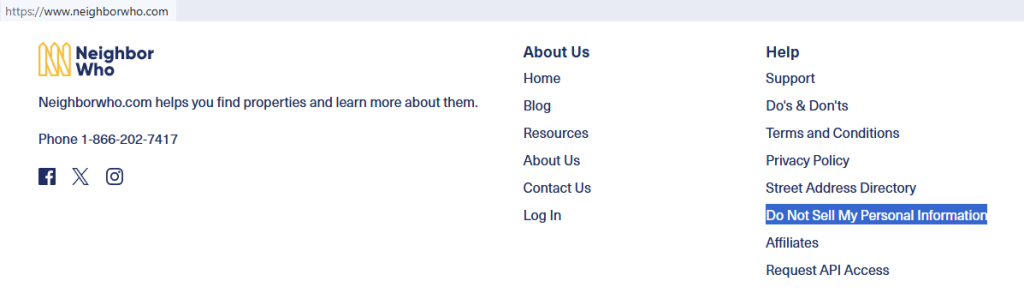
Go to the NeighborWho website. Look for the Do Not Sell My Information link in the footer. Open the official page used for an opt-out request, then review the instructions before you start. If you take screenshots, blur addresses, names, and other private information. A good tip is to use a private browser window so old search results do not stay cached.
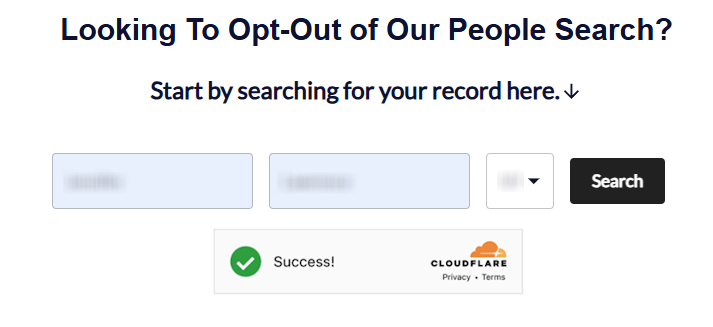
Search for your record
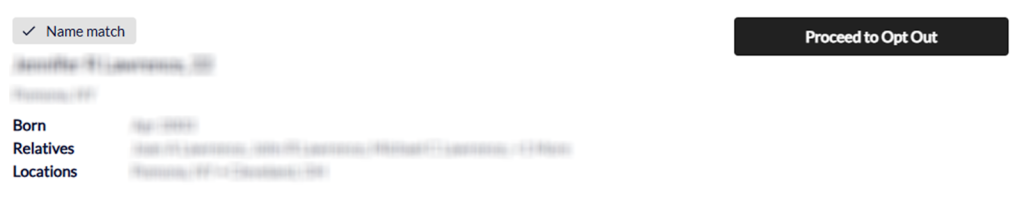
Enter your name and location in the search tool, then review the matches carefully. Pick the listing that fits your current or past address. Because information from NeighborWho may be grouped from more than one source, you may see several results. If you save a screenshot, redact personal details first. Try an old address, too, if the first search is unavailable or does not show the right record.
Submit your email
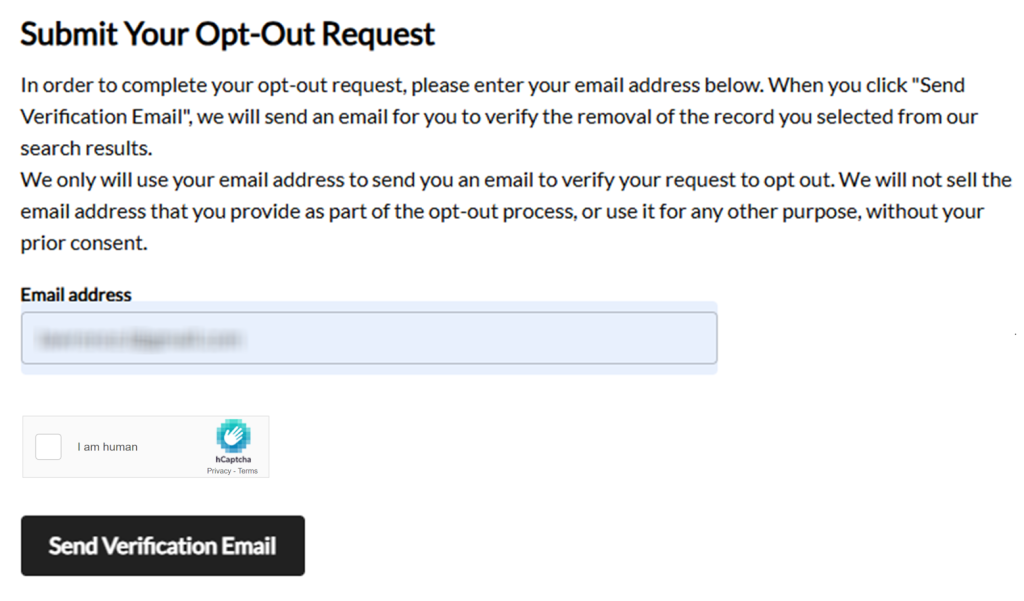
After you choose the right listing, enter your email address in the field. Check the address carefully before you submit the form. If you save proof of the request, hide inbox details and other personal data. A simple tip is to copy the page title and date for your records.
Confirm deletion
Open the message in your inbox and click the link. That final step tells the site to process the removal. Keep the email once you receive a confirmation. If you store a screenshot, blur your email address and any record details associated with the request. Check Spam or Promotions if the message is not in your main inbox.

Track confirmation & timeline
Changes usually appear after the next refresh, often within about 24 hours. After that, search again and confirm the listing is gone. If it still appears, clear the cache and check once more. Save only the proof you need and blur personal information in any screenshots. Set a 3–6 month reminder because data broker sites can refresh listings over time.
Timelines, Verification & What to Expect
Most requests are processed quickly. You will usually see an on-page notice or get a message in your inbox. If nothing arrives, check Spam first, then try the form once more. If there is still no update after the normal window, use the official contact route and share only the additional information needed to locate the listing. This keeps the process practical and supports privacy laws, CCPA (the California Consumer Privacy Act), and compliance paths described by the service.
Edge Cases & Troubleshooting
- No access to the original email/phone: Use your current inbox first, then contact the privacy team if the form needs more support.
- “Record not found”: Search old addresses, name variations, and nearby locations. Records can shift as the database updates.
- CAPTCHA or submission errors: Refresh the page, try another browser, and send the form again once.
- Verification link not arriving: For listing removal, look for an email, check Spam, and retry once.
- Form rejects the request by region (EU/UK/CA): Review the policy for regional rights and the right contact route.
- Account deletion vs. public listing removal confusion: Subscription cancellation is different from listing removal. Use the listing tool for public results and account help for subscriptions.
- Re-submitting after a failed attempt: Wait for the normal processing window, then try again with the same details.
- Request mismatch: Correct any inaccuracy before retrying, so the request must match the listing closely enough for review.
Will my data reappear?
It can. NeighborWho and other data broker services like it may refresh listings when new source files, reseller feeds, information from their database, or updates from other third parties are added. That is why removing personal information once may not keep it off every broker or all people search websites for good. To reduce repeat exposure, keep your emails, check every 3–6 months, and act quickly if the listing returns. This proactive routine can support data protection and reduce your digital footprint across data broker sites like NeighborWho.
Manual vs Assisted Removal
Manual:
- Pros: Full control over each opt step; no fee to remove your information; easier to review each form, email, and timing detail.
- Cons: More time across many sites; repeat monitoring is done manually; harder to track re-listing across data brokers and people search sites.
Assisted:
- Pros: Faster work across many listings; dashboard tracking, recurring checks, and support with personal information from NeighborWho; helpful for broader privacy protection and repeat checks.
- Cons: Service cost; less direct control over each action; some tools may ask for additional information.
We remove your data for you - faster, verified, trackable.
Discover Which Sites Share Your Private Details—Instantly and Free.
878,069 have already used our service
FAQ
NeighborWho is a service that focuses on address-based lookup results. It combines public-source and commercial-source materials into listings about homes and residents, then displays that information online in one place.
Use the official removal flow, locate the matching listing, enter your email, and finish the inbox step. Then check again after the normal processing window.
Start from neighborwho.com and use the official help or footer links to reach the removal page. That is the normal place to begin a NeighborWho opt-out.
Check Spam, Promotions, and Updates first. If it is still missing, confirm that you entered the correct inbox and try again.
Updates often appear after the next refresh, usually within about 24 hours. Cached pages can make old results show for a short time.
Review each match and act on every listing that belongs to you. Similar names and old addresses can create more than one result.
You usually do not need an account for listing removal. Open the data removal tool and complete the email step there.
Subscription changes are separate from public listing removal. Use account or support tools for a NeighborWho cancel request, and use the listing tool for public results.
You can usually send your own request, and some policies also allow an authorized agent. Use the listed contact route if extra review is needed.
Check the name, location, and other matching details first. A small mismatch can stop the request from being processed correctly.
Check once after about 24 hours, then every 3–6 months. That helps you remove your personal information quickly if it returns.
Use the official contact or policy route. Safeguard copies of NeighborWho’s notices.

Posted by Ava J. Mercer
More Public & Property Records Removal Guides
- BlockShopper Opt Out Guide
- BusinessProfiles Opt Out Guide
- City-Data Opt Out Guide
- ClustrMaps Opt Out Guide
- Florida Residents Directory Opt Out Guide
- Homemetry Opt Out Guide
- Michigan Residents Database Opt Out Guide
- MineralHolders Opt Out Guide
- My Health Record Opt Out Guide
- Neighbor.Report Opt Out Guide
- NeighborWho Opt Out Guide
- NJ Parcels Opt Out Guide
- NJPropertyRecords Opt Out Guide
- North Carolina Resident Database Opt Out Guide
- Ohio Residents Database Opt Out Guide
- OnlineSearches Opt Out Guide
- Rehold Opt Out Guide
- SearchSystems Opt Out Guide
- US Records Opt Out Guide
- VoterRecords Opt Out Guide